

Most practices let staff handle the CAQH profile. The provider is busy, the deadline is close, and the office manager knows where the documents are. That works until someone asks who attested, who changed the malpractice dates,s or what happens when the staff member leaves.
This guide explains how CAQH delegation works. You’ll find out what can be done by the providers and by the staff, how the process is performed, and how audits are kept in case of any violations. Read the important notes first so that you might then get to the needed section.
Key Takeaways
- What staff can do: enter and export shared practice data for the provider.
- Who must attest: the provider, inside the provider’s own account.
- Audit trail: CAQH keeps an activity log, but keep your own change log too.
- Staff turnover: suspend or remove access the day someone leaves.
What CAQH Delegation Means
CAQH delegation means someone other than the provider helps maintain the profile. The provider stays responsible for it. The profile is owned by the clinician as the clinician accepts responsibility for its contents.
Practice Manager, Delegate and Group Administrator: What Is the Difference?
People use these words loosely, so here is how they are used in this article.
- Practice Manager (PM). A user of the Practice Manager Module. This person enters shared practice data once and exports it to many provider profiles.
- Delegate. A common word for any staff member or vendor who helps with a provider’s profile.
- Group administrator. The main user for a delegated group. Under CAQH’s delegated groups service, the administrator submits a single roster for all of a group’s health plans and decides which plans may access it.
Why Practices Use Delegation
Delegation saves time. The practice where 10 providers work is located at one address and has the same tax information and hospital affiliations. Some data should be entered just once instead of doing this ten times.
What Staff Can Do and What the Provider Must Do
The line between the two roles matters. CAQH’s own FAQ for providers and practice managers says attestations must be completed within the individual provider accounts, and that supporting documents must be uploaded within the provider’s own profile.
Who Does What in a Delegated CAQH Profile
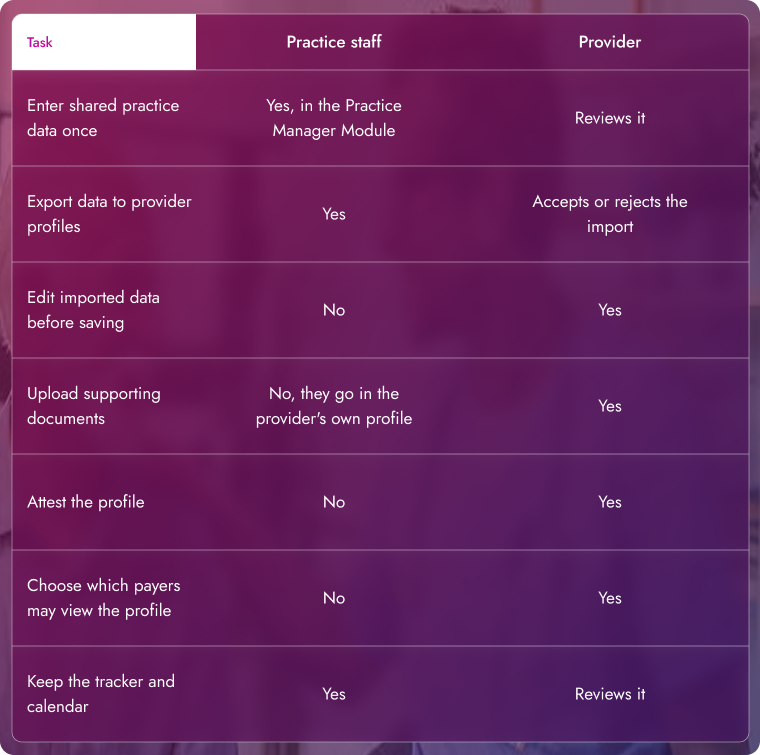
Four sections can be exported from the Practice Manager Module: credentialing contact, professional liability insurance, practice location, and hospital affiliation. Everything else is entered in the provider’s own profile.
Do you require assistance in keeping the CAQH profiles updated? We may take care of this process for you; just contact us!
Who Must Attest? The Provider
Attestation is the provider’s assurance that the profile is correct. Staff can prepare everything, but the attestation is done by them alone.
Why the Provider Signs
The supplier answers the questions about disclosure, stands behind malpractice history, and carries the authority of the signature. When a contractor or employee misses a re-attestation,n the blame goes to the provider’s admissions anyway.
A Note on Conflicting Advice
Some vendor articles say a delegate can attest for a provider. CAQH’s FAQ says attestations must be done in the provider’s account. We follow the CAQH wording. If your reimbursing agent or the credentialing agency tells you differently, ask for the rule in writing before you start depending on it.
How to Set Up Delegate Access Safely
Adding users screen changes regularly, so confirm each step in the portal or ask CAQH support. This is our workflow.
- Name one responsible person. Select the employee or the contractor and write his name down. Do not use shared logins.
- Get the provider’s approval. Access to a provider’s data starts with the provider.
- Do not share the provider’s password. Employees have to use their own account to log in so it will be reflected in the log.
- Enter shared data in the Practice Manager Module. Add locations, liability insurance, credentialing contact,t and hospital affiliations once.
- Export it to each provider. Data cannot be undone, so check it before sending.
- The provider reviews the import. The provider accepts or rejects it, edits it,t and uploads documents.
- The provider attests. Then record the date.
If the data changes, then export it again. The provider imports the update and attests again.
The Audit Trail: What CAQH Records and What You Should Keep
CAQH gives each account an activity log. Its user manual claims that it includes recent activity such as logins, re-attestations, and updates. The user guide does not state whether actions made by the practice manager are visible and does not contain field change tracking.
For delegated groups, CAQH states that roster history is tracked and recorded. Groups can also see when each plan downloaded the roster file. Because the portal log may not answer every question, keep a short log of your own.
Sample CAQH Change Log
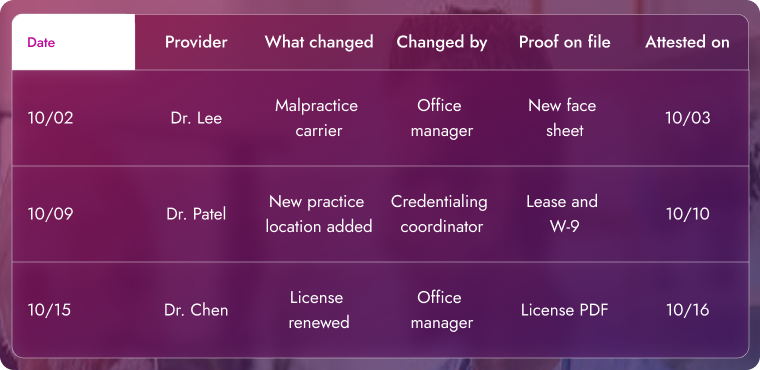
Store the log, the documents,s and the attestation confirmations together. If a payer asks why a date changed, you can answer in a minute.
Removing Access When Staff Leave
Do this on the day someone leaves. Do not wait for the next attestation.
- Suspend or remove the user. CAQH’s FAQ says users in the Practice Manager Module cannot be deleted. An admin user can mark the user’s status as Suspended.
- Check the admin list. Keep at least two admin users, so one departure never locks you out.
- Review the user list every quarter. Remove former staff and vendors you no longer use.
- Send reminder emails to a team address. A reminder sent to a former employee helps nobody.
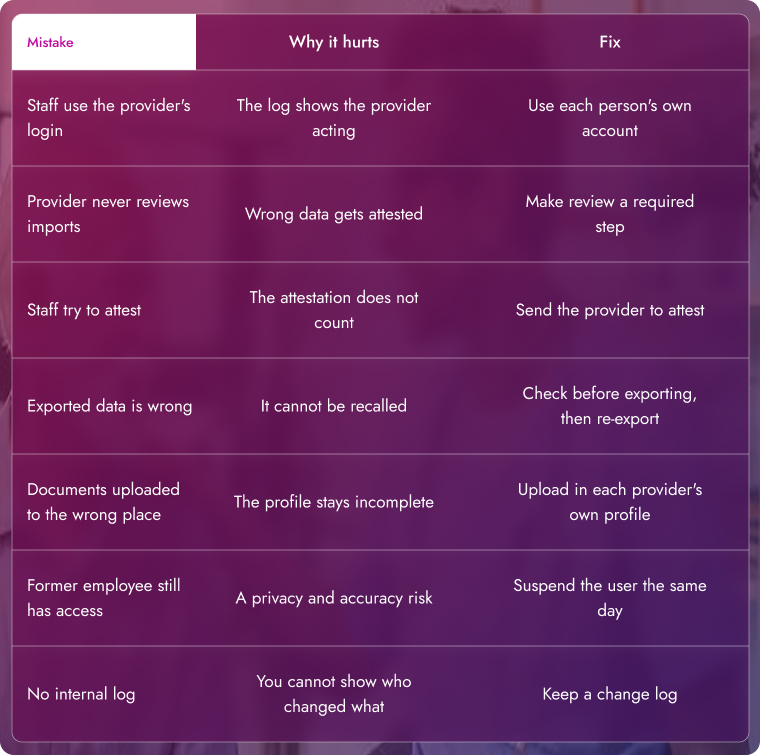
Common Delegation Mistakes and Fixes
Common CAQH Delegation Mistakes
A Workflow for Group Practices
Run CAQH like a monthly routine.
- Keep one tracker with each provider’s CAQH ID, last attestation date, next due date, and document expirations.
- Set a reminder about 90 days after each attestation.
- Review shared data every month for new locations, tax changes, and hospital affiliations.
- Ask providers to attest within two business days of your request. Spot check a few profiles each quarter. A renewed license is easy to miss if the new PDF was never uploaded.
When to Hand CAQH to a Credentialing Company
Outsourcing helps when your staff has no time or the group keeps growing. It does not move responsibility. The provider still attests, and you still need status reports. Ask any vendor for the tracker, the change log, and the attestation dates every month.
Frequently Asked Questions
Can a practice manager attest for a provider?
No. CAQH’s FAQ says attestations must be completed in the individual provider’s account.
Can staff upload a provider’s documents?
Supporting documents must be uploaded in the provider’s own profile, according to CAQH’s FAQ.
Who owns the CAQH profile?
The provider. Staff can help, but the provider is accountable for what the profile says.
Does CAQH keep an audit trail?
Each account has an activity log with logins, re-attestations, and data updates. We could not confirm that it shows every action by a practice manager, so keep your own log.
Can I recall data I exported to a provider?
No. Once exported, it cannot be recalled. Fix it and export again.
How do I remove a former employee?
Users in the Practice Manager Module cannot be deleted. An admin user can mark the user as Suspended.
How often must the provider attest?
Every 120 days in most cases. Some plans set their own rules, so check each payer.
Where do I get help with access problems?
Contact CAQH support through the portal.
Final Thoughts
Delegation works when roles are clear. Staff prepares, the provider approves and attests, and a simple log shows who did what. If you want a team to run the routine, we can take it over.
Want your credentialing handled start to finish? Get a free credentialing review.
