
Most health plans check your CAQH ProView profile prior to making the final decision on your acceptance in their network. If you did not complete, update, or make your profile available for a particular insurance company, your enrollment in that particular insurance company network will be postponed. Many providers lose weeks to this one profile.
This guide will help you get started and keep going. Below is what this blog contains: documents required in this procedure; registration; attestation process; authorization of payers and errors that delay application processing. Please take time to read through the key points prior to proceeding with a particular topic.
Key Takeaways
- What it is: one online profile that participating health plans use for credentialing.
- Cost: free for providers.
- Attestation: every 120 days (180 days in Illinois, per BCBSIL).
- Biggest trap: a profile that is complete but not attested, or not shared with the payer.
What Is CAQH ProView?
CAQH ProView is an internet-based system that allows for the submission of credentialing information in a single location. When you use it, you do not need to create a new application for each payer, since CAQH ProView is a database that allows you to modify your information and let other users download what they need from that database.
The profile consists of all the information about you, including educational qualifications, various licenses, work history, malpractice insurance, places where you work, and answers to all of the questions asked. The system does not check the validity of data you provided; instead, payers would verify the data against various resources.
ProView, Provider Data Portal and DataSpring: What the Names Mean
You will find numerous terms for the same concept. In 2026, CAQH rebranded as DataSpring, powered by CAQH. The portal is currently referred to as the CAQH Provider Data Portal, which was previously known as CAQH ProView. According to the credentialing providers, there have been no changes made to the login URL (proview.caqh.org), provider ID, or the 120 days. Please ensure you check the portal in case anything seems different upon logging in. The terminology used by payers and guidelines continues to be “ProView”; therefore, this article utilizes both terms.
Who Needs a CAQH Profile?
A CAQH ID is typically required for any clinician who joins commercial health care plans. This includes physicians, nurse practitioners, therapists, counselors, and all other billing providers. Not every plan uses CAQH ID; however, Medicare uses its own system called PECOS to enroll clinicians into its program. Before you begin with any new payer, ask them if they require a CAQH ID.
What to Gather Before You Register
To help speed up the setup process, have your documents ready. CAQH has listed some of the documents that you should have available, including: a W-9 form, DEA certificate(s), controlled substance certification(s), State licensure(s), ID numbers, and Malpractice Insurance Policy. The initial profile can take up to two hours, and longer with many locations or a long history.
CAQH Profile Document Checklist
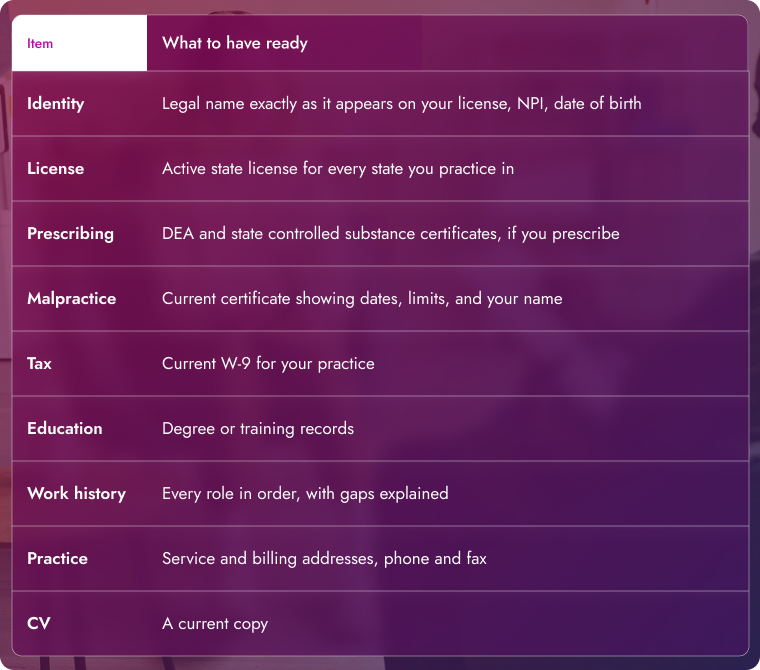
Match your name across every document. When you have a mismatch between your profile and license, it’s one of the quickest ways to get a profile flagged.
How to Set Up Your CAQH ProView Profile
Follow these steps in order. Don’t leave out the authorization part since a completed profile that is inaccessible to potential payers won’t benefit you at all.
- Check for an existing ID. If you have had a CAQH Provider ID before, ask your group, former employer, or insurance company. You need to combine duplicate accounts manually; therefore, check to see if you have one first.
- Register. Create an account by going to the registration page. It is important for your username to be at least eight characters, while the password must also consist of eight characters, and it needs to be different from the username chosen. You also pick three security questions.
- Save your CAQH ID. Once you’ve completed your registration, CAQH will send you your Provider ID via email. Include this information in all credentialing documentation, as many insurance providers require it.
- Fill in each section. Please complete the various sections of the application, including personal information, education, licensing, past work, insurance details, place of work, and questions related to disclosures in the application.
- Upload your documents. Include recent copies of licensing documents, insurance papers, and everything else mentioned in the checklist.
- Review your data summary. Rectify any mistakes pointed out by the system.
- Authorize your payers. Indicate the organizations allowed to see your information.
- Attest. Ensure that the data is correct and make a digital signature.
How CAQH Attestation Works
Attestation is your signed statement that the profile is accurate. Payers look at it more closely than the percent complete number. A profile can show 100 percent complete and still be unattested, and payers may not rely on it.
How Often Do You Have to Attest?
Every 120 days, BCBSIL indicates every 180 days for the providers of Illinois; thus, be sure to verify the particular rules related to your plan and state. The cycle will continue regardless of any changes. Add a reminder on your calendar. Around 90 days after the previous attestation.
How to Re-Attest Step by Step
- Sign in to the portal.
- Select Review and fix any items flagged as required.
- Open each section and update anything that changed.
- Replace documents that have expired or will soon.
- Select Review Complete if nothing changed.
- Select Attest and upload any supporting documents.
- Write down the attestation date. Your next deadline counts from it.
What Happens If Your Attestation Lapses?
Payers can’t see your profile any longer. New applications stall, and a recredentialing request can be missed. The two sources we checked provide no information on how long your grace periods last, so don’t count on one. To get back in the game, just log in, change the profile, replace expired documents, and attest again.
Updating Your Profile Between Attestations
Make sure you change your profile whenever something significant changes. This refers to any occurrence of your moving to a new place, starting with a new employer, obtaining a new license, or switching your malpractice insurance carrier. Simply saving an edit will not submit it to the payers. They will only see updates when you attest again; therefore, make sure to do it after any significant adjustments are made.
How to Authorize Payers on Your Profile
Your profile is private until you give authorizations. On the authorization page, you have an option to authorize all organizations or choose several selected organizations. In case a payer is missing from the list, please tell him to include you in their provider list.
Review the list a few times a year. Remove plans you no longer work with. Add new ones before you apply, so the credentialing team can pull your data on day one.
Our team handles this step often. If you want help, see our provider credentialing services.
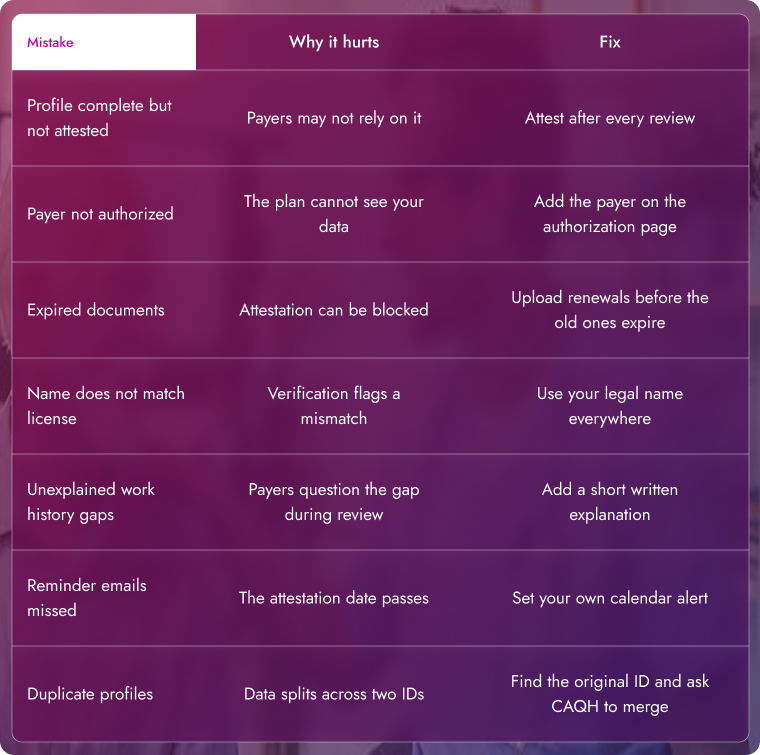
Common CAQH ProView Mistakes and How to Fix Them
Most stalled profiles trace back to a short list of errors.
Common CAQH Mistakes
Managing CAQH for a Group Practice
A single platform can facilitate the management of multiple service providers. Changes can be initiated by the administrators and the delegates; however, the service provider must necessarily confirm the association and endorse the attestation. Should the service provider shift to a different practice, the delegate access must be set up once again.
Create a basic document where details such as the CAQH ID of the provider, attestation date, and expiration of documents would be noted down. That one sheet prevents most lapses.
A Simple CAQH Maintenance Routine
Organize your agenda based on the 120-day cycle.
- Don’t forget to set reminders 90 days after each attestation.
- Make sure to review every section at every attestation, since you never know when something might have changed.
- Upload your new malpractice and license documents immediately after they get renewed.
- Update your CAQH profile on the day you change an employer or an office.
- Check on your payer authorizations twice a year.
Frequently Asked Questions
Is CAQH ProView free?
Yes. The portal is free for providers. Participating health plans and organizations fund it.
How often do I need to attest?
Every 120 days, or every 180 days in Illinois, according to BCBSIL. Attest again after any material change.
Is CAQH ProView the same as the CAQH Provider Data Portal?
Yes. The Provider Data Portal is the current name for ProView after the 2026 DataSpring rebrand, and the login address stayed the same according to vendor reports.
How long does setup take?
CAQH says an initial profile can take up to two hours. It takes longer with many locations or a long history.
Do I need a CAQH profile for Medicare?
No. Medicare enrollment uses PECOS. A CAQH profile is for the commercial plans that ask for it.
What happens if my profile expires?
Payers can no longer view it, and applications may stall. Sign in, update the profile, and attest again.
Why can’t a payer see my profile?
Usually, you have not authorized that payer, or your attestation has lapsed. Check both.
Can my billing company manage my CAQH profile?
A delegate can help with updates. You still approve access and sign the attestation.
Final Thoughts
A clear CAQH profile saves you a week on each payer application. Collect your documents, complete each section of the application, give permission to your payers, and testify as per the schedule. If you would like us to do it for you, we can do that too.
