
CAQH credentialing is not optional for most commercial payers. It is the gateway to getting paid.
A provider with a complete, attested, and current CAQH profile moves through credentialing in 90 to 120 days. The same provider with a missing license upload or an expired attestation waits six months or longer. The difference is not the payer. The difference is the CAQH profile.
This guide explains what CAQH is, why every provider needs a profile, how to set it up correctly, and how to maintain it so claims never stop because of a credentialing issue.
What Is CAQH?
CAQH stands for the Council for Affordable Quality Healthcare. It is a nonprofit alliance of health plans and trade associations. CAQH created an online database called CAQH ProView where healthcare providers store their professional information in one place.
More than 1.4 million healthcare providers use CAQH ProView. Over 1,000 health plans and healthcare organizations access this database to verify provider credentials.
The old way of credentialing worked like this. A provider wanted to join a payer network. The provider filled out a paper application. The provider attached copies of licenses, diplomas, and insurance certificates. The provider mailed the package. The next payer asked for the same information. The provider filled out another paper application. The provider made more copies. The provider mailed another package. Every payer required a separate application with the same information repeated over and over.
CAQH changed this process. Providers enter their information once into the CAQH ProView system. Payers access that information directly from CAQH. Providers no longer fill out separate paper applications for every payer.
Why Healthcare Providers Need CAQH Credentialing?
CAQH credentialing directly affects whether a provider gets paid. Here is why.
Most commercial payers require CAQH
Aetna, Cigna, UnitedHealthcare, and most other commercial payers use CAQH ProView for credentialing. Without an active CAQH profile, these payers will not process a provider’s enrollment application. No active profile means no network participation. No network participation means no reimbursed claims.
CAQH is the single source of truth
Payers pull credentialing data directly from CAQH ProView. They do not accept paper applications in most cases. If the CAQH profile is incomplete or inaccurate, the payer cannot verify the provider’s qualifications. The application stalls.
One profile serves all payers
A provider who joins three payer networks does not fill out three separate applications. The provider completes one CAQH profile and authorizes all three payers to access it. This saves hours of administrative work.
Recredentialing happens automatically
Payers recredential providers every three years. With CAQH, the provider updates the profile once. All authorized payers see the updated information. No separate recredentialing applications for each payer.
Who Needs a CAQH Profile
Most healthcare professionals who bill commercial insurance need a CAQH ProView profile. This includes:
- Physicians (MD and DO)
- Nurse practitioners (NP)
- Physician assistants (PA)
- Certified registered nurse anesthetists (CRNA)
- Registered nurses (RN) in certain roles
- Physical therapists
- Occupational therapists
- Speech language pathologists
- Behavioral health providers (psychologists, LCSW, LPC, LMFT)
- Registered dietitians
- Respiratory therapists
There is no federal mandate requiring CAQH ProView. But most commercial payers require it as part of their physician credentialing process. Without a profile, providers cannot join most commercial networks.
What Information Goes into a CAQH Profile?
A CAQH ProView profile contains comprehensive professional information. Payers use this data to verify that a provider meets their qualification standards.
Personal Demographics
- Full name (must match exactly with licenses)
- Date of birth
- Social Security number
- Gender
- Languages spoken
- Contact information
Licenses and Identifications
- State medical or professional licenses (active and unrestricted)
- DEA certificate (if the provider prescribes controlled substances)
- Board certifications
- Malpractice insurance coverage (carrier, policy number, limits, effective dates, retroactive date)
Education and Training
- Medical school or graduate program attended
- Graduation dates
- Diplomas and transcripts
- Residency and fellowship training
- Completion letters and dates
Work History
- Employment history for the past five to ten years
- Practice locations and addresses
- Gaps in employment of over 30 days require written explanations
- Hospital affiliations and admitting privileges
Disclosures
- Malpractice claims and settlements
- Disciplinary actions from licensing boards
- Sanctions from Medicare, Medicaid, or other programs
- Felony convictions
Practice Information
- Practice addresses and locations
- Tax identification number (TIN)
- Billing contact information
- New patient status for each location
Attachments
Providers upload supporting documents directly into the CAQH system:
- Current state license copies
- DEA certificate copy
- Board certification certificates
- Malpractice insurance face sheet
- Curriculum vitae (CV)
- W-9 form
- Government-issued photo ID
How to Set-Up a CAQH Profile?
Setting up a CAQH ProView profile takes time. Most providers complete the initial setup in one to two hours.
Here’s how healthcare providers setup the CAQH Account:
Register for a CAQH Account
Go to proview.caqh.org. Click the Register button. Enter the following information:
- Full legal name
- Date of birth
- Social Security number
- National Provider Identifier (NPI)
- State license number and issuing state
- DEA number (if applicable)
- Email address
CAQH sends a confirmation email with a CAQH Provider ID. Save this ID. It is the key to accessing the profile.
Complete the Profile Data Sections
Log into the CAQH portal using the new credentials. Click Profile Data from the home page. Complete every section marked with a red asterisk. These are required fields.
Do not skip sections. Do not leave blanks. Payers will not begin credentialing review until the profile shows 100 percent complete. Red fields indicate missing data .
Save work frequently. The system times out after periods of inactivity.
Upload Supporting Documents
For each section, upload the required supporting documents. CAQH accepts PDF, JPEG, and other common file formats. Ensure documents are legible. Blurry or cut off documents get rejected.
Common documents to upload:
- State license (front and back if applicable)
- DEA certificate
- Board certification certificate
- Malpractice insurance face sheet showing coverage dates and limits
- Current CV
- W-9
Authorize Payers to Access the Profile
Providers must explicitly authorize each payer to access their CAQH data. Without authorization, the payer cannot pull the information needed for credentialing.
To authorize payers:
- Navigate to the Authorize section in the portal
- Search for the payer by name
- Select the payer from the list
- Choose authorization level (global or specific)
- Save the authorization settings
Global authorization allows all payers with which the provider is working to access the profile. Specific authorization allows only selected payers. Most providers use global authorization for simplicity.
Review and Attest
After completing all sections and uploading all documents, click Review and Attest. The system runs an automated check for missing or inconsistent information.
If errors appear, click View Errors and fix the flagged fields. Continue until no errors remain.
Once the profile is error free, click Attest. Attestation means the provider swears under penalty of perjury that all information in the profile is true, accurate, and complete.
Submit to Payers
After attestation, the provider submits the enrollment application to each target payer. The application includes the CAQH Provider ID. The payer uses this ID to pull the credentialing data directly from CAQH.
Do not wait for payers to find the profile. The provider must initiate the enrollment process with each payer separately. CAQH is a data repository, not an automatic enrollment system.
The 120 Day Re-Attestation Requirement
CAQH requires providers to reattest their profiles every 120 days. This is not optional. It is a hard requirement built into the system.
Re attestation means logging into the CAQH portal, reviewing all profile information, confirming that nothing has changed, and clicking the Attest button again. The process takes five to ten minutes.
What Happens When a Provider Misses Re-Attestation
The consequences of missing the 120-day deadline are severe.
- The CAQH profile goes inactive
- Payers cannot access an inactive profile
- Credentialing applications in progress stall
- Recredentialing applications cannot be processed
- Some payers terminate providers who fail to maintain an active CAQH status
One missed attestation can freeze tens of thousands of dollars in claims. A three-provider group once had $72,000 in claims blocked because one provider’s CAQH attestation expired.
How to Track Re-Attestation Deadlines?
CAQH sends email notifications when the reattestation deadline approaches. Do not rely on these emails alone. Emails go to spam. Email addresses change. Staff miss notifications.
Build a separate tracking system. Add the 120-day deadline to a calendar. Set reminders at 90 days, 60 days, 30 days, and 7 days. For group practices with multiple providers, stagger reattestation dates so they do not all come due at the same time.
Common CAQH Mistakes and How to Avoid Them?
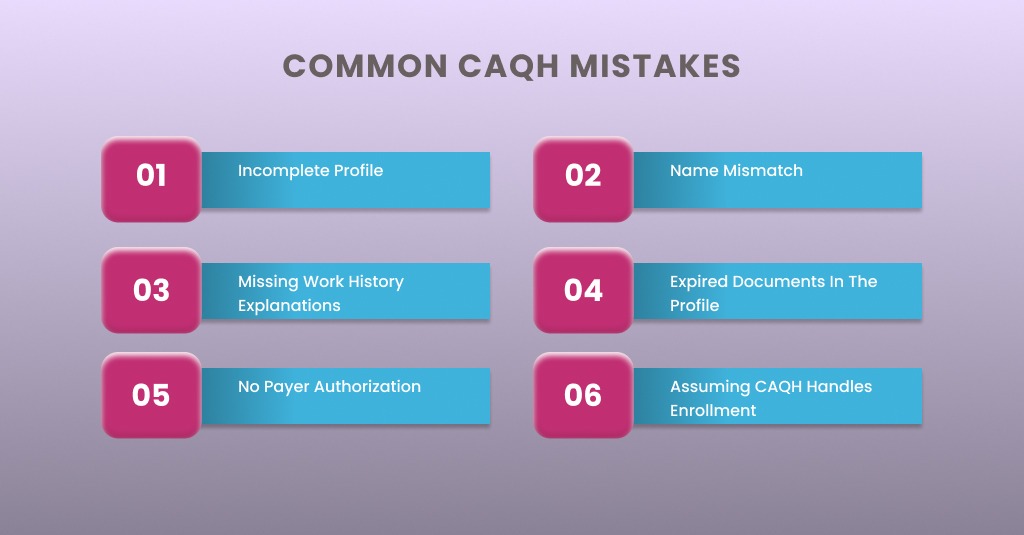
Providers make the same CAQH mistakes over and over. Here are the most common errors and exactly how to avoid each one.
Incomplete Profile
The provider fills out most sections but leaves a few fields blank. The profile shows 95 percent complete. The provider assumes this is good enough. It is not. Payers require 100 percent completion before they begin credentialing review.
How to avoid – Review the profile data page carefully. Red asterisks mark required fields. Complete every required field. Run the automated check by clicking Review and Attest. Fix every error before attesting.
Name Mismatch
The provider’s name on the state license says “Robert Smith.” The CAQH profile says “Bob Smith.” The NPPES registry says “Robert A. Smith.” These mismatches trigger automatic flags. Payers reject the application or send it to manual review.
How to avoid – Use the exact legal name that appears on the state license. Match the name exactly across CAQH, NPPES, DEA, and all licenses. Do not use nicknames or abbreviations.
Missing Work History Explanations
The provider’s CV shows a six-month gap between jobs. The CAQH profile does not explain the gap. The payer flags the application. The provider must submit a written explanation, delaying the process by weeks.
How to avoid – For any employment gap longer than 30 days in the past five to ten years, write a brief explanation. Examples include maternity leave, relocation, continuing education, or illness. Keep explanations factual and brief.
Expired Documents in the Profile
The provider uploaded a state license that expires in 60 days. The provider forgets to renew it. The license expires. The CAQH profile now contains an expired document. Payers reject the application because the provider holds an expired license.
How to avoid: Track license renewal dates separately. Upload renewed licenses to CAQH immediately upon receipt. Do not wait for the re attestation cycle. Update documents as soon as they change.
No Payer Authorization
The provider completed the CAQH profile and attested to it. But the provider never authorized any payers to access the data. The payer submits an enrollment request. CAQH blocks access because no authorization exists. The provider wonders why the application is taking so long.
How to avoid – Immediately after attestation, navigate to the Authorize section. Add every payer the provider plans to work with. Set authorization to “Yes, I grant access.” Save the settings. Confirm that each payer appears in the authorized list.
Assuming CAQH Handles Enrollment
A provider completes the CAQH profile and assumes the job is done. Claims come back denied months later. The provider never submitted enrollment applications to individual payers. CAQH does not automatically enroll providers in any network.
How to avoid – Treat CAQH as a data repository only. After completing the CAQH profile, submit a separate enrollment application to each target payer. Include the CAQH Provider ID on each application. Follow up with each payer until approval is confirmed.
CAQH Processing Timelines and Expectations
CAQH itself does not process applications. CAQH stores data. Payers pull data from CAQH and process their own credentialing applications. Timelines vary by payer.
- Initial CAQH profile setup – One to two hours for the provider to complete
- CAQH data verification – CAQH reviews uploaded documents within 48 hours of attestation
- Payer credentialing after CAQH submission – 90 to 180 days for most commercial payers
- Payer recredentialing – Every three years, typically 60 to 120 days
- CAQH re attestation – Every 120 days, five to ten minutes to complete
The National Committee for Quality Assurance (NCQA) mandates that payers complete credentialing within 180 days. This is the maximum allowed time, not a guarantee. Some payers complete faster. Some take the full 180 days.
How to Check CAQH Profile Status
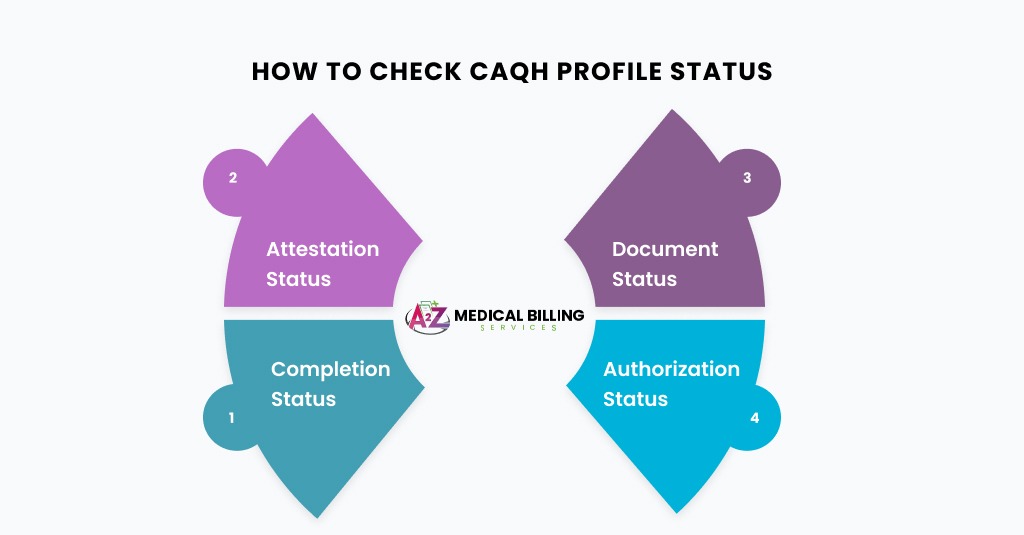
Providers can check their CAQH profile status at any time by logging into the portal.
- Completion status – The dashboard shows what percentage of the profile is complete. 100 percent is required.
- Attestation status – The dashboard shows the date of last attestation and the date the next attestation is due.
- Document status – Each uploaded document shows a status of pending, approved, or rejected. Rejected documents require re upload.
- Authorization status – The Authorize section shows which payers have access and whether access is active.
For payer-specific credentialing status, providers must contact each payer directly. CAQH does not track payer enrollment status.
CAQH for Group Practices
Group practices face additional CAQH considerations beyond individual provider profiles.
Individual Providers Still Need Profiles
Each provider in the group must have their own individual CAQH profile. The group cannot submit one profile for all providers. Each provider’s credentials must be verified separately.
Group NPI and CAQH
CAQH profiles are for individual providers, not for group practices. The group’s Type 2 NPI and tax identification number are handled through separate payer enrollment processes, not through CAQH.
Coordinating Multiple Providers
Group practices should assign one staff member to track CAQH reattestation dates for all providers. A spreadsheet with provider names, CAQH IDs, last attestation dates, and next due dates prevents missed deadlines.
New Providers Joining a Group
When a new provider joins an existing group, the provider must already have or create a CAQH profile. The group then submits a request to each payer to add the provider to the group’s existing contract. The payer pulls the provider’s CAQH data for credentialing.
Conclusion
CAQH credentialing is not optional for providers who want to bill commercial insurance. It is the foundation of the entire enrollment process. Without an active, complete, and attested CAQH profile, providers cannot join payer networks. Without network participation, providers cannot collect reimbursed revenue.
Complete Revenue Cycle Management — A2Z Medical Billing
CAQH is where revenue starts. We manage everything from there to the last paid claim.
A complete CAQH profile is step one. Behind it is a credentialing timeline, payer enrollment applications, effective date confirmation, EFT and ERA setup, and 90 days of follow-up before your first in-network claim clears. A2Z Medical Billing handles the entire cycle, so you treat patients while we build the billing infrastructure that gets you paid.
- CAQH setup, maintenance, and re-attestation management
- Commercial payer enrollment — Aetna, UHC, Cigna, BCBS, and regional plans
- PECOS and Medicaid enrollment on parallel timelines
- EFT and ERA enrollment with each payer at approval
- Claims submission, denial management, and appeals
- Ongoing credentialing maintenance and recredentialing
